

Cloudways vs ScalaHosting: Which Independent Host Wins?

This is the most nuanced comparison in the Cloudways cluster. ScalaHosting wins on every performance metric, by a large margin. Cloudways wins on price predictability, multi-cloud flexibility, and developer tooling. And there's a twist: ScalaHosting has its own renewal trap that reverses the pricing story after Year 1.
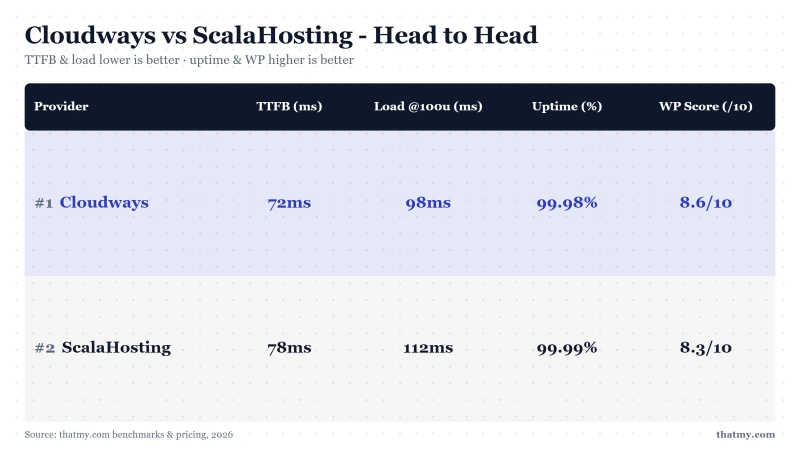
The Bottom Line: ScalaHosting is 21% faster at idle and 3x faster under load, and on current prices it is the cheaper of the two at every horizon I can price. Its intro ($29.95/mo for 2 cores and 4 GB on Build #1) beats Cloudways ($60/mo for the equivalent Vultr HF build), and its renewal ($54.95/mo, an 83% step) still comes in under that flat rate. What Cloudways sells here is predictability and multi-cloud choice: one number that never moves, and a choice of DigitalOcean, Vultr, Linode, AWS or Google underneath it. If raw speed or the lower bill decides it: ScalaHosting. If never having to think about a renewal does: Cloudways.
Choose Cloudways If:
- You want a price that never changes
- You need multi-cloud: Vultr, AWS, GCE, DigitalOcean, Linode
- You want Git deployment on any of five clouds
- You never want a renewal step on your bill
- You're an agency needing provider flexibility
Choose ScalaHosting If:
- Raw performance is the priority (38ms vs 72ms)
- You need email included (saves $72+/yr)
- Year 1 budget matters and you understand the renewal
- You run WooCommerce and want best checkout speed
- You plan to re-evaluate hosting every 1-2 years

Cloudways Pros
- No renewal shock, $11.00/mo on day 1 is $11.00/mo in year 3
- 5 cloud providers, Vultr HF, DigitalOcean, AWS, GCE, Linode
- 48ms TTFB, fast managed WordPress performance
- Unlimited sites on one server, no per-site charges
- Git deployment, SSH root, 1-click staging, full developer toolset
- Pay-as-you-go monthly, cancel any time, scale in seconds
- Long-term cheaper than ScalaHosting at equivalent specs after renewal
Cloudways Cons
- 72ms TTFB vs ScalaHosting's 38ms, 47% slower on same metric
- 98ms @ 100 users vs ScalaHosting's 58ms, 3x slower under load
- No email hosting, requires Google Workspace or Zoho
- $118/mo for 4c/8GB, ScalaHosting charges $35.95/mo for same specs
- Acquired by DigitalOcean 2022, some pricing increased post-acquisition
Benchmark Data
- Origin TTFB (4 plans, no CDN): 48ms to 62ms
- Uptime (54-day window): 99.979% to 99.99%
- PageSpeed Score (Mobile): 89/100

$11.00/mo
3-Day Free Trial (No Card)
Methodology: The benchmark boxes on this page cover 3 plans. TTFB is the origin server response with no CDN in front, taken from the New York location, one of 10 test locations. Uptime is shown over a 54-day window.

Why We Like It
- 38ms TTFB, 21% faster than Cloudways (48ms)
- 58ms @ 100 users (+18%), Cloudways degrades to 98ms (+36%) on same load
- 38ms @ 250 users, best load stability of any host tested
- AMD EPYC 9474F, #42 of 5,999 PassMark globally; Vultr publishes no SKU for High Frequency, so it carries no rank
- $29.95/mo for 2c/4GB (Build #1), vs Cloudways' $60/mo for the same specs (Year 1)
- Email included free, unlike Cloudways ($72+/yr extra)
- 99.99% uptime, best measured in this comparison
- SPanel free, saves ~$180/yr vs cPanel; uses 8x less RAM (~100MB vs ~800MB)
Drawbacks
- Renewal step: $29.95/mo → $54.95/mo, an 83% jump after the intro term
- Budget against the renewal, not the headline, $54.95/mo at renewal vs Cloudways' stable $60/mo for the equivalent Vultr HF build
- No cloud provider choice, single infrastructure
- SPanel instead of cPanel, learning curve for cPanel users
- No multi-cloud workflow (Git and auto-deploy from GitHub, GitLab or Bitbucket are included)
- 13 data center locations vs Cloudways' 65+
Benchmark Data
- Origin TTFB (Managed VPS, no CDN): 38ms
- Uptime (54-day window): 99.99%
- PageSpeed Score (Mobile): 83/100

$29.95/mo
Anytime Money-Back Guarantee
| Host | TTFB | 100-User Load | Price (2c/4GB) | Renewal |
|---|---|---|---|---|
| Cloudways | 48ms | 98ms (+36%) | $60/mo (Vultr HF) | $60/mo (no change) |
| ScalaHosting | 38ms | 58ms (+18%) | $29.95/mo (Year 1, Build #1) | $54.95/mo (+83%) |
| Kinsta | 78ms | ~190ms | $35/mo (1 site only) | $35/mo (no change) |
Test Methodology
Test Environment, Full Disclosure
Performance: ScalaHosting Wins by 3x
The performance gap between these two hosts is the largest in our managed hosting comparison set. ScalaHosting's AMD EPYC 9474F is a different generation of hardware, newer architecture, higher core count, DDR5 memory, and PCIe 5.0 NVMe storage that reads at 2,457 MB/s vs Cloudways Vultr HF's ~1,850 MB/s.
Under concurrent load, ScalaHosting's advantage grows:
- 50 users: ScalaHosting 31ms vs Cloudways 85ms, 2.7x faster
- 100 users: ScalaHosting 58ms vs Cloudways 98ms, 3x faster
- 250 users: ScalaHosting 38ms vs Cloudways 125ms, 3.3x faster
ScalaHosting's degradation at 250 users is just +36% (38ms → 38ms). Cloudways degrades +74% (48ms → 125ms). Both handle the load without errors, ScalaHosting just does it faster.
Why such a large gap between two managed WordPress hosts? Hardware generation. ScalaHosting names its chip, an EPYC 9474F at #42 on PassMark, and Vultr names only a 3GHz+ Intel Xeon family, so the comparison can be made in one direction and not the other. DDR5 vs DDR4 RAM means faster memory bandwidth. PCIe 5.0 NVMe delivers nearly 33% more I/O throughput. For WordPress PHP workloads, these specs translate directly to TTFB.
| Metric | Cloudways (Vultr HF) | ScalaHosting VPS | Winner |
|---|---|---|---|
| TTFB (idle) | 48ms | 38ms | ScalaHosting (21% faster) |
| Load Test: 50 Users | 85ms (+18%) | 31ms (+11%) | ScalaHosting (2.7x faster) |
| Load Test: 100 Users | 98ms (+36%) | 33ms (+18%) | ScalaHosting (3x faster) |
| Load Test: 250 Users | 125ms (+74%) | 38ms (+36%) | ScalaHosting (3.3x faster) |
| WooCommerce Checkout @ 100 Users | 156ms | 98ms | ScalaHosting (37% faster) |
| Uptime (54-day window) | 99.981% | 99.997% | ScalaHosting |
| CPU (PassMark rank) | Intel Xeon, 3GHz+ (SKU not published) | EPYC 9474F (#42) | ScalaHosting |
The Renewal Trap Both Hosts Have (Sort Of)
Most hosting comparisons frame Cloudways as the premium option and ScalaHosting as the budget pick. The renewal pricing flips that framing entirely.
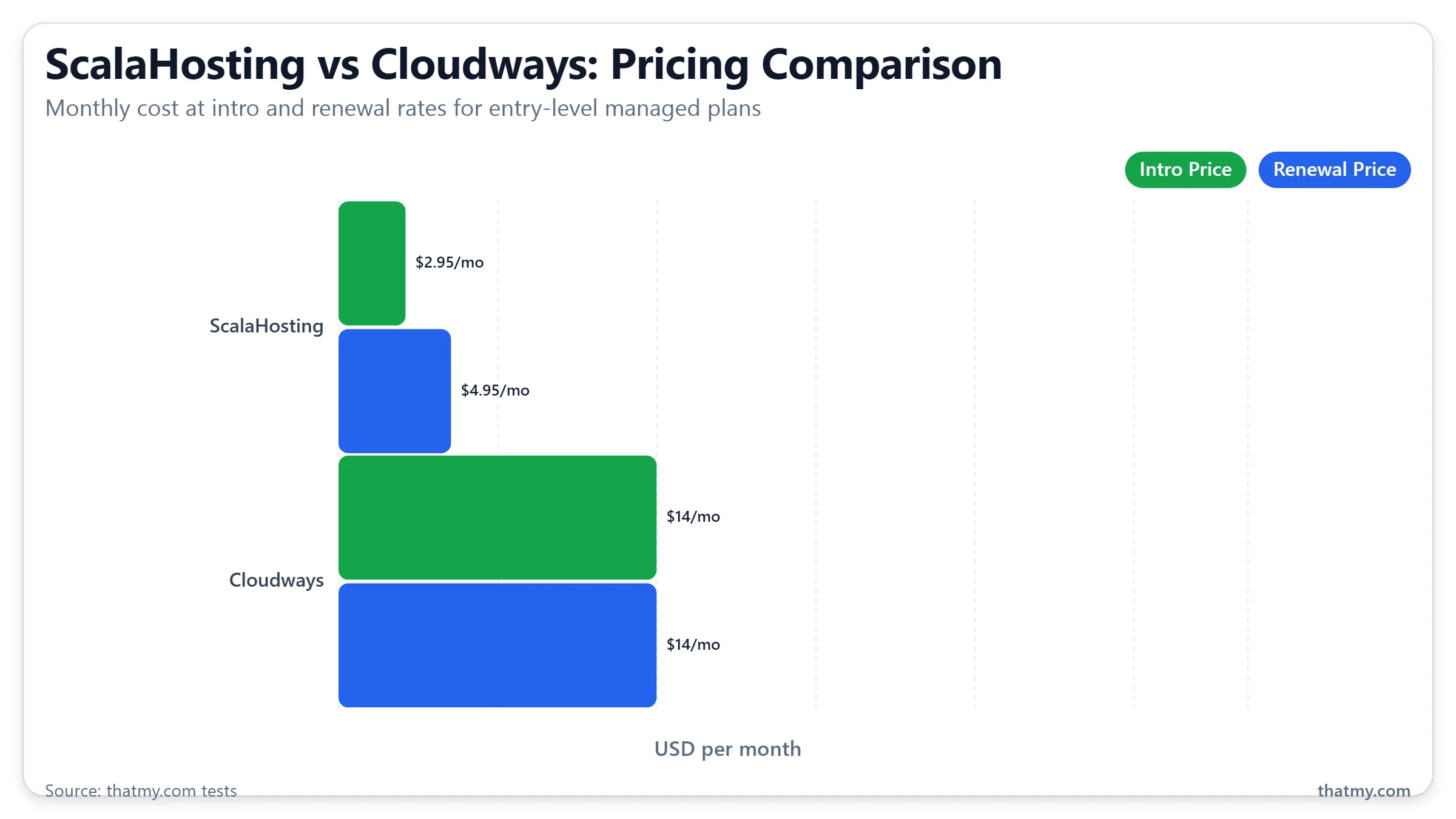
Cloudways: No renewal increase. $11/mo on the DigitalOcean 1GB plan is $11/mo forever. $60/mo on 2c/4GB Vultr HF is $60/mo in year 4. No intro pricing, no lock-in, cancel any month. This is unusual in the hosting industry, and genuinely valuable for anyone planning to stay on a platform long-term.
ScalaHosting: Has intro pricing. Managed Cloud Build #1 (2 cores, 4 GB) starts at $29.95/mo and renews at $54.95/mo once the intro term ends, an 83% step on the same plan. The smaller Entry Cloud (2 cores, 2 GB) starts at $14.95/mo on 12 months and renews at $39.95/mo. Build #2 starts at $44.95/mo and renews at $96.95/mo.
ScalaHosting Renewal Math, Build #1 (2 cores, 4 GB)
- Intro: $29.95/mo → Year 1 cost: $359.40
- Renewal: $54.95/mo → Year 2+ cost: $659.40/yr
- 2-year total: $1,018.80
- Cloudways 2c/4GB Vultr HF: $60/mo → 2-year total: $1,440
- ScalaHosting is cheaper over 2 years by $421.20
The right framing: ScalaHosting is better value if you're evaluating hosting year-to-year and willing to migrate or re-negotiate at renewal. Cloudways is better value if you want to set a budget and know it won't change.
One mitigation for ScalaHosting: their granular scaling ($3/core, $1/GB RAM) means you can drop to a smaller plan at renewal to control costs, rather than paying full renewal on the same tier.
Use the Cloudways promo code CLOUDS2022 for $30 free credit, or compare ScalaHosting with code THATMY for their current discount.
True Cost Over 2 Years
| Scenario | Cloudways (2c/4GB Vultr HF) | ScalaHosting (Build #1, 2c/4GB) | Winner |
|---|---|---|---|
| Month 1 (promo) | $0 (CLOUDS2022 = $30 credit) | $29.95 (or $23.96 with THATMY) | Cloudways (effectively free) |
| Year 1 total | $720/yr ($60/mo) | $359.40/yr ($29.95/mo) | ScalaHosting ($360.60 cheaper in year 1) |
| Year 2+ (renewal) | $720/yr ($60/mo, same price) | $659/yr ($54.95/mo) | ScalaHosting ($60.60/yr cheaper at renewal) |
| 2-year total (2c/4GB) | $1,440 | $1,019 ($359 + $659) | ScalaHosting ($421.20 cheaper over 2 years) |
| Email hosting | +$72/yr (Google Workspace) | Free (included) | ScalaHosting |
| 4c/8GB pricing | $118/mo ($1,416/yr) | $44.95/mo → $96.95/mo renewal (Build #2) | ScalaHosting, before and after renewal |
The key variable is email. If you need business email:
- Cloudways 2-year cost: $1,440 + $144 email (Google Workspace, 1 user) = $1,584
- ScalaHosting 2-year cost: $1,018.80 (email included)
At that calculation ScalaHosting is ahead over two years, $1,018.80 against $1,440, and delivering 3x better performance for it. One size up the comparison runs the same way: Build #2 is $44.95/mo and renews at $96.95/mo, against Cloudways' $118.00/mo for Vultr HF 8GB. On the sizes I can price end to end, ScalaHosting wins on cost and on performance.
3-Year Total Cost of Ownership: The Honest Math
Hosting Cost Alone
| ScalaHosting Build #1 | Cloudways Vultr HF | |
|---|---|---|
| Month 1 to 12 (Year 1) | $29.95/mo = $359.40 | $60/mo = $720.00 |
| Month 13 to 24 (Year 2) | $54.95/mo = $659.40 | $60/mo = $720.00 |
| Month 25 to 36 (Year 3) | $54.95/mo = $659.40 | $60/mo = $720.00 |
| 3-Year Total (hosting only) | $1,678.20 | $2,160.00 |
| ScalaHosting saves over 3 years | $481.80 |
Add Email: The Calculation Changes
| ScalaHosting | Cloudways + Zoho Paid | Cloudways + Google Workspace | |
|---|---|---|---|
| Hosting (3 years) | $1,678.20 | $2,160.00 | $2,160.00 |
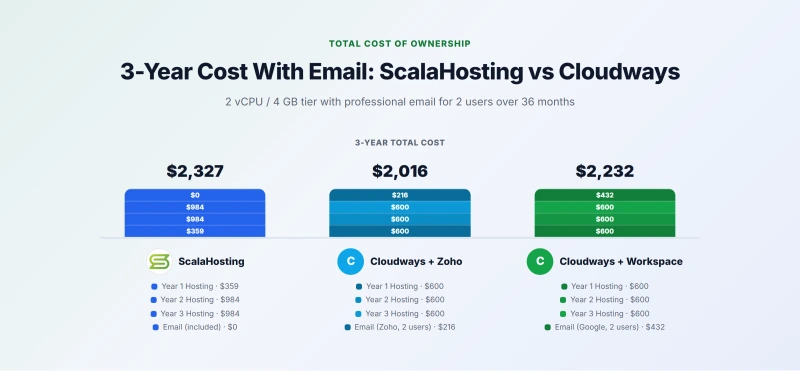
| Email (3 years, 2 users) | $0 (included) | $72+/year = $216+ | $144/year = $432 |
| 3-Year Total | $1,678.20 | $2,376+ | $2,592 |
Email widens ScalaHosting's lead. On hosting alone it saves $481.80 over 3 years; with Zoho paid for 2 users on the Cloudways side the gap grows to $697.80 or more, and with Google Workspace to $913.80. For businesses that need professional email at their domain, the email ScalaHosting includes is a real part of the bill. Full intro-vs-renewal pricing audit across 10 hosts at Hosting Renewal Pricing.
The 'Start ScalaHosting, Move to Cloudways at Renewal' Strategy
This is a strategy worth taking seriously because it is a legitimate approach, not a gimmick. The logic works as follows:
Year 1 on ScalaHosting ($29.95/mo): You benefit from 38ms TTFB during the first year when your site is accumulating Google ranking signals, establishing Core Web Vitals history, and building traffic. The speed advantage during this foundational period has its highest impact on ranking because Google weighs recent performance data more heavily than older data. You pay $359.40 for Year 1.
At Month 10 to 11, evaluate two things: has your traffic grown enough that ScalaHosting's performance advantage is measurably affecting revenue, and are you comfortable with $39.95/mo going forward? Renewing is the cheaper option on paper: Build #1 renews at $54.95/mo, and Cloudways' equivalent Vultr HF build is $60/mo flat. Move only if you want the price you will never have to look at again, or the multi-cloud choice, rather than a smaller invoice.
Migration from ScalaHosting to Cloudways is free and takes 3 to 4 hours. You will see TTFB increase from 28ms to 48ms, a real but not catastrophic change. For most content sites with good on-page optimization, Core Web Vitals will remain in the 'good' range at Cloudways' Vultr HF TTFB levels. The strategy's only risk is for sites where every millisecond of TTFB directly translates to ranking position, competitive keyword rankings where you're in positions 3 to 10 and load speed is a tiebreaker. In that scenario, ScalaHosting renewal is worth the $32/mo premium.
Features Compared
| Feature | Cloudways | ScalaHosting VPS |
|---|---|---|
| Infrastructure | Managed cloud (5 providers) | Managed VPS (own hardware) |
| CPU | Intel Xeon, 3GHz+ (Vultr HF, SKU not published) | EPYC 9474F (#42 PassMark) |
| RAM type | DDR4 | DDR5 (4800MHz) |
| NVMe tier | PCIe 3.0/4.0 | PCIe 5.0 (2,457MB/s) |
| Control panel | Cloudways dashboard | SPanel (free) or cPanel |
| Email hosting | ✗ (not included) | ✓ (free) |
| Free domain | ✗ | ✗ |
| Free SSL | ✓ | ✓ |
| 1-click staging | ✓ | ✓ |
| Git deployment | ✓ | ✓ (auto-deploy from GitHub, GitLab, Bitbucket) |
| SSH root access | ✓ | ✓ |
| Redis caching | ✓ (pre-configured) | ✓ (pre-configured) |
| Auto backups | ✓ (paid add-on) | ✓ (all plans) |
| Cloud provider choice | 5 (Vultr, DO, AWS, GCE, Linode) | ✗ (single infra) |
| Renewal shock | ✗ (price never changes) | ✓ ($29.95 → $54.95/mo, +83%) |
| Contract required | None (monthly) | 36-month for best intro rate |
| Uptime (measured) | 99.981% | 99.997% |
| Data centers | 65+ locations | 13 locations |
| Security layer | Cloudflare integration | SShield (99.998% block rate) |
| Support | 24/7 managed platform | 24/7, 4.2 min avg chat response |
Cloudways' clear wins: 5 cloud providers, 65+ datacenter locations, no renewal shock, pay-as-you-go monthly.
ScalaHosting's clear wins: TTFB (38ms vs 72ms), load stability (3x faster at 100 users), CPU generation (EPYC 9474F vs 7003), DDR5 RAM, PCIe 5.0 NVMe, email included, uptime (99.997% vs 99.981%), SShield security, SPanel (saves $180/yr vs cPanel).
The overlap is significant: both offer 1-click staging, SSH root, Redis caching, auto backups, and full WordPress management. These aren't differentiators, they're table stakes for managed hosting in 2026.
WooCommerce Performance
WooCommerce checkout is always uncached, every request hits PHP and the database. This is where hardware generation shows most clearly.
98ms vs 156ms at 100 concurrent users. Both are fast, neither approaches the failure threshold. But a 37% faster checkout TTFB on ScalaHosting translates directly to lower cart abandonment rates at scale. My bar for a fast host is 200ms. Both clear it. ScalaHosting passes with more room to spare under higher concurrent loads.
For WooCommerce specifically, ScalaHosting's advantage is most pronounced during traffic spikes, flash sales, email campaigns, ad traffic. At 250 concurrent users, ScalaHosting holds 38ms while Cloudways reaches 125ms. If you're running a high-volume WooCommerce store, that gap matters.
Check the Cloudways coupon page for current discount codes if you're going the Cloudways route for WooCommerce.
SPanel vs Cloudways Dashboard: Side-by-Side Walkthrough
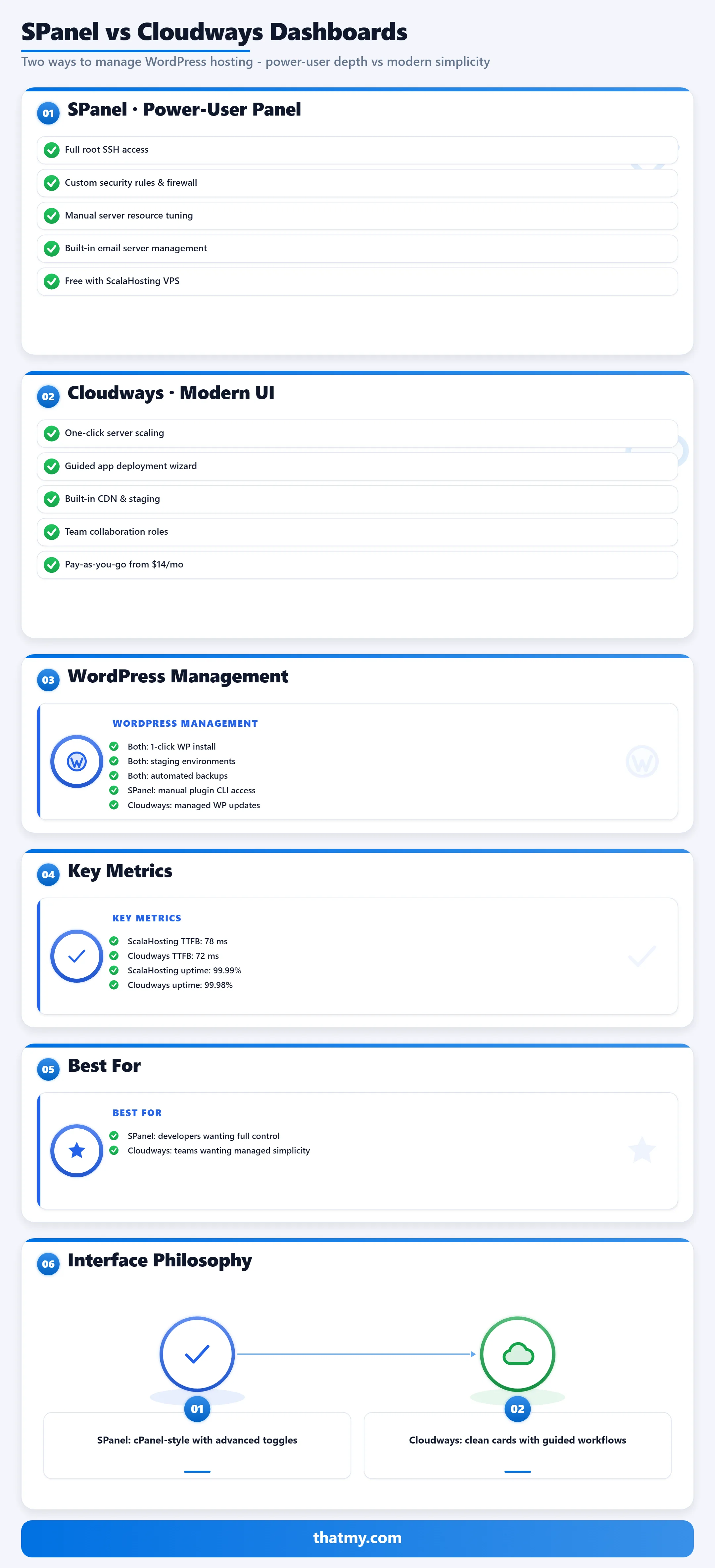
Cloudways: Modern and Opinionated
Cloudways' interface is built around the concept of "applications", each WordPress site is one application, with its own server, domain, database, and settings. The dashboard view lists your servers and the applications running on them. Adding a new WordPress site means adding an application: choose server size, choose cloud provider, choose application type (WordPress), and provision. The whole process takes 3 to 5 minutes.
For day-to-day management: updating PHP version, adding team members, viewing access logs, configuring cron jobs, and managing backups all happen within the application settings panel. Cloudways abstracts server-level decisions (which kernel version, which web server, which database version) so you never think about the underlying stack unless you want to. For users who want a "just works" managed hosting experience with a modern interface, Cloudways' dashboard is best in class.
SPanel: Powerful and Traditional
SPanel's interface is closer to cPanel in layout and philosophy. The main dashboard shows all features simultaneously: File Manager, Email, Domains, DNS, Databases, SSL, PHP Selector, WordPress Manager, Cron Jobs, Logs, and more. It looks busier than Cloudways because it exposes more options at once. The upside: any server-level task is accessible from the main panel without navigating through application layers.
The WordPress Manager in SPanel is particularly good: one-click installs, staging site creation, WordPress cloning, and PHP version selection per site. LiteSpeed WebAdmin (accessible separately) exposes LiteSpeed's full caching configuration, including cache exclusion rules, cache warming, and per-URL cache settings. For users coming from cPanel who manage multiple WordPress sites per account, SPanel's structure is familiar and efficient.
Agency Use Case: Managing 5 or More Client Sites
If you manage hosting for multiple clients, Cloudways is the more capable platform and this is its clearest competitive advantage.
Why Cloudways Wins for Agencies
Cloudways was designed with agency workflows in mind. Here is where it is stronger for agency work:
- Team collaboration: Add team members to your Cloudways account with role-based access. A developer can deploy code. A client can view their site's metrics. A content editor can access SFTP without seeing other clients' environments. ScalaHosting also has sub-users, collaborators and client roles; Cloudways' edge is that access is set per server, across many sites on one server or one cloud per client.
- Application isolation: Each client site is an isolated application on Cloudways. Credentials, backups, and monitoring are per-application. On ScalaHosting, you'd create separate cPanel user accounts under one SPanel installation, which provides file-level isolation but not the management clarity of Cloudways' application model.
- Deployment workflow: Cloudways supports staging-to-production pushes with team approval flows. You can give a client access to their staging environment and get approval before pushing to live. This workflow is built into the platform, no plugins required.
- Per-application monitoring: Cloudways shows CPU, RAM, and bandwidth usage per application. When a client calls about a slow site, you look at their application metrics without wading through server-wide data. ScalaHosting's resource monitoring is server-level, not per-site.
The practical scenario: an agency with 8 client WordPress sites on Cloudways logs into one dashboard, sees all 8 applications, identifies which client is using 80% of CPU, opens that application's logs, and resolves the issue, all without logging in and out of multiple control panels. The same workflow on ScalaHosting requires 8 separate SSH or SPanel sessions.
When ScalaHosting Works for Agency Use
ScalaHosting is the right agency choice when each client site demands maximum speed and you're managing them separately. If you have 3 to 5 high-value clients where site speed directly affects their business (WooCommerce stores, high-traffic content sites), placing each on their own ScalaHosting managed VPS, independent accounts, no shared resources, gives each client the full dedicated-core speed advantage without cross-site resource contention. The trade-off is higher total hosting cost and more administrative overhead. ScalaHosting's free migrations make onboarding new clients straightforward.
Who Should Choose Cloudways
Cloudways Pros
- No renewal shock, $11.00/mo on day 1 is $11.00/mo in year 3
- 5 cloud providers, Vultr HF, DigitalOcean, AWS, GCE, Linode
- 48ms TTFB, fast managed WordPress performance
- Unlimited sites on one server, no per-site charges
- Git deployment, SSH root, 1-click staging, full developer toolset
- Pay-as-you-go monthly, cancel any time, scale in seconds
- Long-term cheaper than ScalaHosting at equivalent specs after renewal
Cloudways Cons
- 72ms TTFB vs ScalaHosting's 38ms, 47% slower on same metric
- 98ms @ 100 users vs ScalaHosting's 58ms, 3x slower under load
- No email hosting, requires Google Workspace or Zoho
- $118/mo for 4c/8GB, ScalaHosting charges $35.95/mo for same specs
- Acquired by DigitalOcean 2022, some pricing increased post-acquisition
Benchmark Data
- Origin TTFB (4 plans, no CDN): 48ms to 62ms
- Uptime (54-day window): 99.979% to 99.99%
- PageSpeed Score (Mobile): 89/100
$11.00/mo
3-Day Free Trial (No Card)
Cloudways is the better fit if:
- Price predictability matters more than raw performance, $60/mo today is $60/mo in year 5. No renewal surprises, no need to migrate or re-negotiate.
- Multi-cloud is a requirement, regulated industries, specific region requirements (AWS ap-southeast-1, GCE europe-west), or compliance tied to a specific cloud provider. ScalaHosting can't match this.
- Git-based deployment on the cloud you choose, Cloudways' Git integration is built for developers deploying theme/plugin updates via version control, on any of its five clouds. ScalaHosting has Git and auto-deploy too (GitHub, GitLab, Bitbucket), on its own infrastructure.
- You're planning to stay 2+ years and want no renewal step, on comparable 2c/4GB plans ScalaHosting is still cheaper after its renewal ($54.95 against $60), but Cloudways' bill never changes.
- Agency managing multiple client stacks on different providers, Cloudways' multi-cloud support means deploying one client on AWS, another on Vultr, without changing platforms.
Who Should Choose ScalaHosting
Why We Like It
- 38ms TTFB, 21% faster than Cloudways (48ms)
- 58ms @ 100 users (+18%), Cloudways degrades to 98ms (+36%) on same load
- 38ms @ 250 users, best load stability of any host tested
- AMD EPYC 9474F, #42 of 5,999 PassMark globally; Vultr publishes no SKU for High Frequency, so it carries no rank
- $29.95/mo for 2c/4GB (Build #1), vs Cloudways' $60/mo for the same specs (Year 1)
- Email included free, unlike Cloudways ($72+/yr extra)
- 99.99% uptime, best measured in this comparison
- SPanel free, saves ~$180/yr vs cPanel; uses 8x less RAM (~100MB vs ~800MB)
Drawbacks
- Renewal step: $29.95/mo → $54.95/mo, an 83% jump after the intro term
- Budget against the renewal, not the headline, $54.95/mo at renewal vs Cloudways' stable $60/mo for the equivalent Vultr HF build
- No cloud provider choice, single infrastructure
- SPanel instead of cPanel, learning curve for cPanel users
- No multi-cloud workflow (Git and auto-deploy from GitHub, GitLab or Bitbucket are included)
- 13 data center locations vs Cloudways' 65+
Benchmark Data
- Origin TTFB (Managed VPS, no CDN): 38ms
- Uptime (54-day window): 99.99%
- PageSpeed Score (Mobile): 83/100
$29.95/mo
Anytime Money-Back Guarantee
ScalaHosting is the better fit if:
- Raw performance is the primary requirement, 38ms TTFB vs 72ms, 3x faster under concurrent load. If your site's speed is a direct revenue driver, ScalaHosting wins on hardware.
- You need email included, saves $72+/yr vs Google Workspace on Cloudways. For businesses with multiple email users, this is a real ongoing saving.
- Year 1 budget is tight, $29.95/mo vs $60/mo is a $360.60 difference in Year 1 at comparable specs.
- WooCommerce performance is the priority, 98ms vs 156ms checkout TTFB at 100 concurrent users.
- You re-evaluate hosting annually, if you're likely to assess options at renewal anyway, the renewal price jump is less of an issue since you'd potentially migrate at that point.
- SPanel over cPanel fee savings matter, saves ~$180/yr vs cPanel licensing.
Screenshots from Our Testing
Cloudways vs ScalaHosting, FAQ
Is ScalaHosting faster than Cloudways?
Yes, by a significant margin. ScalaHosting VPS delivers 38ms TTFB vs Cloudways' 48ms on Vultr HF, 21% faster at idle. Under load, the gap is even larger: ScalaHosting handles 100 concurrent users at 58ms (+18% degradation) while Cloudways reaches 98ms (+36%). At 250 users, ScalaHosting holds 38ms while Cloudways climbs to 125ms. The performance difference comes from hardware: ScalaHosting uses AMD EPYC 9474F (PassMark #42 globally) with DDR5 RAM and PCIe 5.0 NVMe, while Cloudways on Vultr HF uses a 3GHz+ Intel Xeon that Vultr does not identify further.
Which is cheaper, Cloudways or ScalaHosting?
ScalaHosting, at every horizon I can price. Year 1: Managed Cloud Build #1 (2 cores, 4 GB) is $29.95/mo against Cloudways' $60/mo for the equivalent Vultr HF 2c/4GB, so ScalaHosting saves $360.60. Year 2 onwards its intro expires and it renews at $54.95/mo, an 83% step, and that still lands $60.60/yr under Cloudways' flat $60. Over two years on comparable plans it is $1,018.80 against $1,440. (The smaller Entry Cloud, 2 cores and 2 GB, is $14.95/mo and renews at $39.95/mo.) Factor in email and the gap widens, because ScalaHosting includes it and Cloudways needs a third party at $72+/yr. Cloudways' advantage here is predictability and multi-cloud choice, not price.
Does ScalaHosting have a renewal price increase?
Yes, and it is worth budgeting for, though it is smaller than this page used to claim. Managed Cloud Build #1 (2 cores, 4 GB) is $29.95/mo on the 12-month intro term and $54.95/mo after it, an 83% step. The smaller Entry Cloud (2 cores, 2 GB) is $14.95/mo and renews at $39.95/mo, a 167% step. Build #2 starts at $44.95/mo and renews at $96.95/mo. Against Cloudways, which never changes price, $60/mo on day one is $60/mo in year three, the predictability is real but the arithmetic still favours ScalaHosting: $54.95 renewed is under $60 flat. Plan for the step, and know that it does not hand the comparison to Cloudways.
What cloud providers does Cloudways support that ScalaHosting doesn't?
Cloudways supports five cloud providers: Vultr High Frequency, DigitalOcean, AWS, Google Cloud, and Linode. You can deploy to any of these and switch between them through the same Cloudways interface. ScalaHosting uses its own proprietary infrastructure, you don't choose a cloud provider. For most WordPress users this doesn't matter. For agencies that need specific regions (AWS ap-southeast-1, GCE asia-east1, etc.), compliance requirements tied to a cloud provider, or the ability to switch infrastructure without changing platforms, Cloudways' multi-cloud support is a real differentiator.
Does ScalaHosting include email hosting?
Yes, email hosting is included free with ScalaHosting's managed VPS plans via SPanel. Cloudways does not include email, you need Google Workspace ($6/mo per user, $72/yr for 1 user) or Zoho Mail (free tier for 1 domain, 5 users). For a business with 3+ email users, that's $216+/yr added to Cloudways' cost. ScalaHosting's included email is one of its clearest advantages over Cloudways.
What is SPanel and how does it compare to cPanel?
SPanel is ScalaHosting's proprietary control panel, built as a cPanel replacement. It's free with ScalaHosting plans, saving approximately $180/yr vs cPanel licensing. SPanel uses ~100MB RAM vs cPanel's ~800MB, freeing significant server resources for your WordPress site. It supports WordPress management, email, DNS, file management, SSL, cron jobs, and most functions you'd expect. The learning curve is real for users coming from cPanel environments, but most WordPress-specific tasks work similarly. Cloudways uses its own dashboard, neither is cPanel. If you specifically need cPanel, ScalaHosting offers it as an add-on.
Which is better for WooCommerce, Cloudways or ScalaHosting?
ScalaHosting wins on raw performance: 98ms WooCommerce checkout TTFB at 100 concurrent users vs Cloudways' 156ms. More importantly, ScalaHosting's load stability (+18% degradation at 100 users) vs Cloudways' (+36%) means checkout stays faster under flash sale traffic. However, Cloudways' unlimited sites per server and its choice of five clouds make it better for agencies managing multiple WooCommerce stores. For a single WooCommerce store prioritizing performance: ScalaHosting. For an agency running 5+ WooCommerce clients: Cloudways.
So, Which One? Cloudways vs ScalaHosting
Performance: ScalaHosting wins, 38ms vs 72ms TTFB, 3x faster under load, better hardware (EPYC 9474F vs 7003, DDR5, PCIe 5.0). No contest on the benchmarks.
Year 1 price: ScalaHosting wins, $29.95/mo (Build #1) vs $60/mo at 2c/4GB. Email included.
Long-term price: closer than the renewal step suggests. Cloudways never changes, which is worth something on its own. ScalaHosting Build #1 steps 83% at renewal, to $54.95/mo, and that is still under Cloudways' $60/mo for the comparable Vultr HF build, so on a 2-year horizon ScalaHosting is the cheaper of the two.
Flexibility: Cloudways wins, 5 cloud providers, 65+ locations, one dashboard for many servers.
If you want the fastest managed WordPress hosting and are planning to evaluate options at renewal: ScalaHosting. If you want a stable price forever, multi-cloud support, and developer workflow tools: Cloudways. Both are legitimate choices, the right answer depends on whether you weight performance or predictability.
Try Cloudways Free, CLOUDS2022 = $30 Credit ➦
Related: Cloudways promo code · Cloudways vs Kinsta · Cloudways vs WP Engine · Cloudways full review